You write the answers to the common questions
Not every question needs AI. You write the delivery time, the returns process or your opening hours once, and from then on they're one tap away. Always the same, always exact.
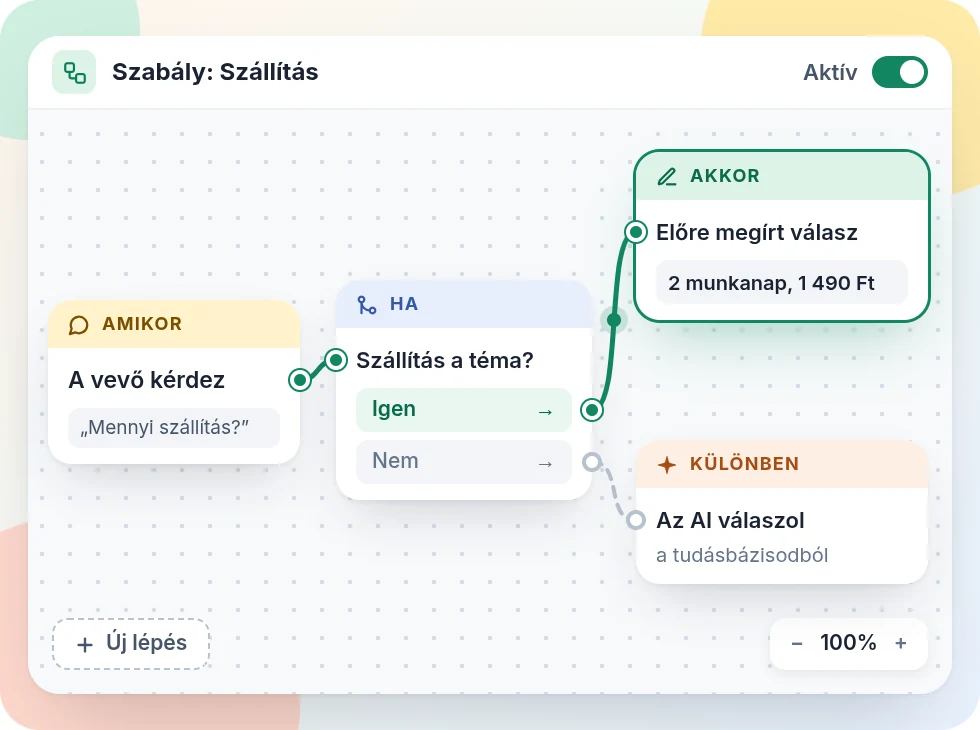
How it works
- 1
Click the questions together
You put buttons and arrows together on a canvas. No code to write, everything with the mouse.
- 2
Tell each button what to do
It can lead to another question, show a reply you wrote, call a colleague, hand the question to the AI, or open a page.
- 3
Publish
Until you publish, visitors see the previous version. So you can edit calmly, and nothing goes live by accident.
What it does
-
What you wrote is what goes out
A reply you wrote is word for word the same for every customer.
-
One tap and the answer is there
Customers don't have to type, and they don't have to wait.
-
Doesn't use your AI allowance
Replies you wrote don't count. Only a button that hands the question to the AI does.
-
Help where the buttons run out
The last button can hand the question to the AI or to a colleague.
-
Edits you can undo
Undo your steps, copy a branch, and edit from your phone too.
-
See what people click
From the Pro plan, the statistics show how many people chose each button.
More features
Tonight, Zuppor answers your customers
Set up in minutes, and try the Pro plan free for 14 days, no credit card.
Get started free